
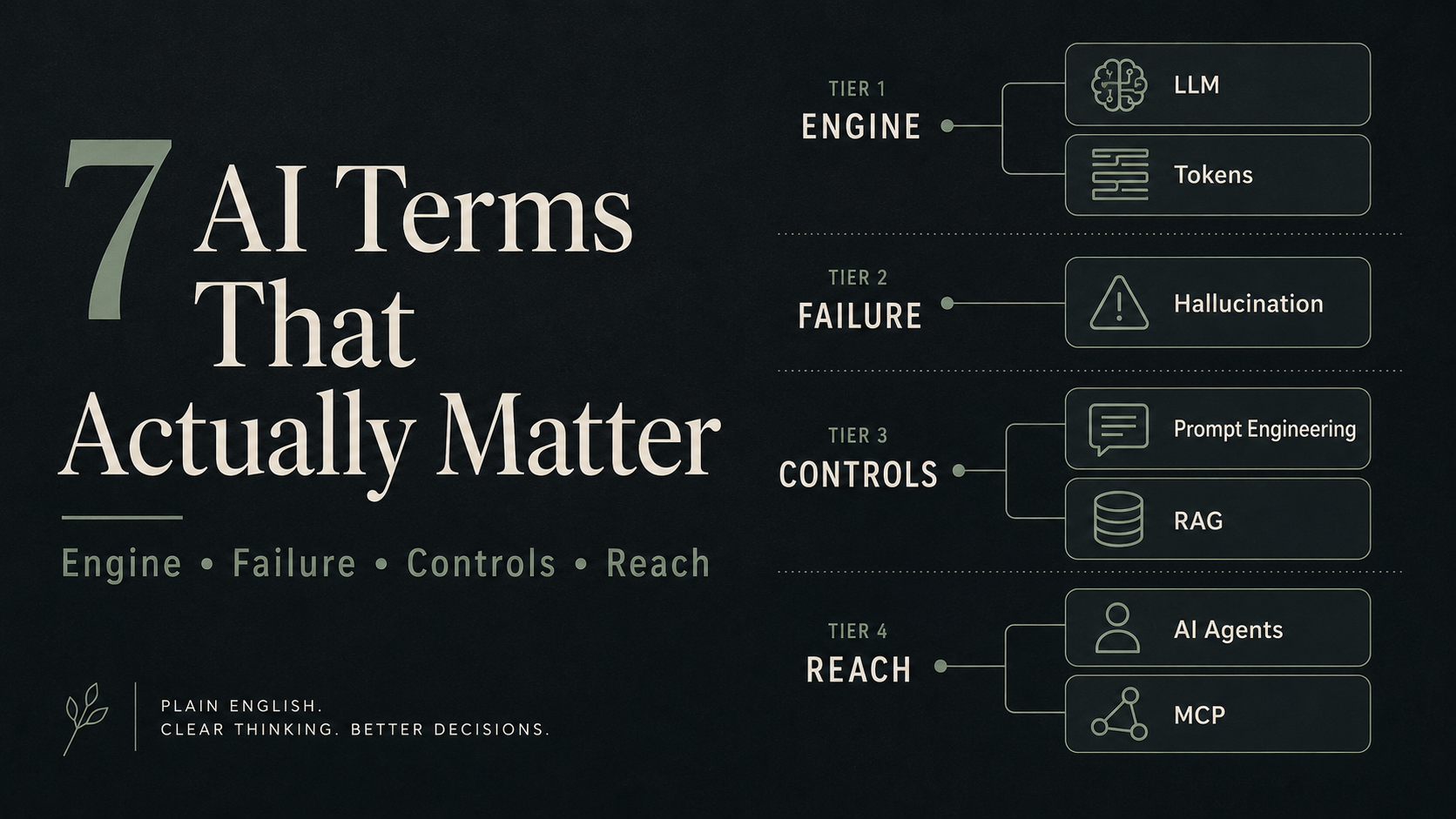
The short answer: You do not need a 200-word AI glossary. You need seven terms: LLM, tokens, hallucination, prompt engineering, RAG, AI agents, and MCP. Together they explain what AI actually is, how it fails, how you control it, and how it plugs into your real work. Learn these seven and you will understand AI better than most people who use it every day. Everything else is detail stacked on top.
Most AI glossaries hand you fifty terms and hope one sticks.
I went the other way. After my stroke, I had to rebuild working memory and focus from a lower baseline, and I did a lot of that rebuilding with AI. When the tool you are leaning on is doing part of your thinking, you stop caring about jargon and start caring about how the thing actually works. What it can hold. Where it lies to you. How to steer it. How to connect it to your own files so it stops guessing.
That pressure filtered the vocabulary down to seven words. These are the terms I use to run my second brain, my morning brief, and Henry, the AI assistant that manages most of my week. Not startup vocabulary. Working vocabulary.
Here they are, in plain English, with the 2026 facts checked rather than repeated.
How the seven fit together
Before the definitions, a simple map. The seven terms are not a random list. They fall into four layers, and once you see the layers, the whole thing gets easier to hold in your head.
- The engine: LLM, Tokens (what the machine is and how it reads)
- The failure: Hallucination (how it goes wrong)
- The controls: Prompt Engineering, RAG (how you steer it and keep it honest)
- The reach: AI Agents, MCP (how it acts and connects to your world)
That is the framework. Engine, failure, controls, reach. Now the terms.
1. What is an LLM (Large Language Model)?
An LLM is the AI model that generates text. It is trained on a huge amount of writing, so it can predict and produce human-like language one piece at a time. It is the engine inside ChatGPT, Claude, and Gemini, not a product on its own.
Every AI writing tool, coding assistant, and chatbot you have touched is powered by one of these. When someone says “we fine-tuned our model” or “this runs on a bigger model,” the model is the brain of the operation.
The mistake most people make: saying “AI” when they mean “LLM.” AI is the whole field. An LLM is one specific kind of AI, the kind writing your emails and drafts. Knowing that difference quietly puts you ahead in almost any AI conversation.
The current families, as of mid-2026:
| Model family | Known for |
|---|---|
| GPT-5 series (OpenAI) | General-purpose, huge ecosystem |
| Claude, Opus 4.8 and Sonnet 5 (Anthropic) | Long-context reasoning, coding |
| Gemini 3 (Google) | Multimodal, tied into Google tools |
| Llama 4 (Meta) | Open-weight, you can self-host it |
Versions move fast, so do not over-memorize the numbers. Before you pay for any AI tool, check which model it runs on. A slick wrapper around an old model gives worse output than a plain one running a current model. The wrapper is not the brain.
2. What are tokens in AI?
Tokens are the small chunks of text an LLM reads and counts, roughly three-quarters of a word each. A 2,000-word article is about 2,700 tokens. Both your input and the AI’s reply are measured this way.
Why you should care: every model has a limit on how much it can hold at once, called the context window. That number decides how much it can keep in its head in a single conversation.
Here is where the old advice is out of date. In 2026 the frontier models cluster around 1 million tokens of context (Claude, GPT-5, Gemini 3). Some open-weight models advertise far more; Meta’s Llama 4 Scout claims 10 million. But advertised context and effective context are not the same thing. Every long-context test ever published shows accuracy sagging on material buried in the middle of a very long input.
Two things creators get wrong about tokens:
- Pasting a whole book and expecting perfect recall. Even a million-token window degrades in the middle. Big is not the same as reliable.
- Forgetting that tokens are cost. Anything running on an API charges per token. Long prompts, at scale, are real money.
The fix is boring and it works: feed the model in chunks. Give it one section, ask for a summary, move to the next. You get sharper output and you stop paying to confuse it.
3. What is an AI hallucination?
A hallucination is confident, fluent output that is simply wrong. A made-up statistic. A citation that does not exist. A link that goes nowhere. The model is not lying. It has no concept of truth, only of the most likely next word.
This is the single reason you cannot publish AI output blind. Sometimes the prediction lands on a fact. Sometimes it lands on fiction wearing a suit, and it sounds exactly the same.
It is not theoretical. In 2023 a New York lawyer filed a court brief full of cases ChatGPT had invented, did not check them, and got sanctioned. Real careers have taken real damage from trusting a fluent answer.
Here is the checklist I actually run:
- Verify every statistic against a primary source.
- Click every link the model gives you. A lot are dead.
- Cross-check names, dates, and quotes with a quick search.
- Ask the model to name its source. It will not guarantee truth, but it sometimes catches its own error.
- Never publish an AI-generated fact you have not confirmed yourself.
I trust the machine with structure and speed. I do not trust it with truth. AI writes my messy first draft and roughly halves my drafting time. Then I fact-check every claim by hand, including for this post. That division of labor is the whole game. An AI that cannot check its own work is just a confident stranger.
4. What is prompt engineering?
Prompt engineering is the skill of writing instructions that get the output you actually want. It is not chatting with a bot. It is designing the input so the tone, format, depth, and accuracy are under your control.
The gap between a beginner and an expert using the same tool is almost never the tool. It is the instructions. A sharp prompt can turn a cheap subscription into something that replaces a stack of expensive help.
The structure I use has five parts. Call it Role, Context, Task, Format, Constraints:
| Part | What it does |
|---|---|
| Role | Tells the model who to be (“act as a careful editor”) |
| Context | Gives it the background it cannot guess |
| Task | States the one job, plainly |
| Format | Specifies the shape of the output |
| Constraints | Sets the limits: length, tone, what to avoid |
Most bad output traces back to a missing piece. Vague prompt, generic answer. No example, the model guesses your style. No constraints, it rambles.
The single best upgrade is keeping a prompt library. When a prompt works, I save it. Reuse beats reinvention. That habit alone saves me hours a week, and it is most of what lives in how I use AI for writing.
5. What is RAG (Retrieval-Augmented Generation)?
RAG is when an AI looks up real, current information before it answers, instead of relying only on what it memorized in training. It is the difference between a model guessing from memory and a model checking its notes first.
Every LLM has a knowledge cutoff. It does not know what happened last week. RAG closes that gap by connecting the model to live or private data at the moment you ask.
A plain analogy: an LLM on its own is a brilliant consultant who read everything up to a certain date and has not checked anything since. RAG hands that consultant a phone and your filing cabinet.
You are almost certainly already using it:
- Perplexity searches the web before answering.
- ChatGPT and Claude with browsing or file uploads read live pages or your documents first.
- Notion AI pulls from your workspace to answer.
Why it matters if you build anything: without retrieval, a chatbot answers from vibes. With retrieval, it answers from your actual material. When I built a second brain that Claude can search, RAG is the piece that makes it quote the real note instead of inventing one. Retrieval is what turns a clever guesser into a reliable one.
6. What are AI agents?
An AI agent is a system that takes actions, not just answers questions. It plans, uses tools, browses, writes and runs code, checks its own work, and completes multi-step tasks without you steering every move. This is the shift from AI as chatbot to AI as coworker.
A chatbot waits for your next message. An agent takes a goal and goes.
| Chatbot | Agent |
|---|---|
| You ask, it answers | You assign, it executes |
| One turn at a time | Multi-step workflows |
| Needs guidance at each step | Plans and self-corrects |
| Generates text only | Uses tools, writes code, and browses |
Real agents in 2026:
- Claude Code reads your codebase, writes code, runs tests, and fixes bugs from the terminal.
- Devin (Cognition) takes a task description and works through it end-to-end.
- ChatGPT’s agent mode (OpenAI folded the old Operator into it) browses and completes tasks for you.
My own version is Henry, the AI executive assistant I built to run my calendar, briefs, and follow-ups, backed by a small council of specialized agents.
A simple test: if you are copying, pasting, and switching tabs to guide every step, you are using a chatbot. If you describe the goal and walk away, you are using an agent.
7. What is MCP (Model Context Protocol)?
MCP is one universal standard that lets an AI connect to outside tools and data. Instead of a custom integration for every app, you build one connection and any MCP-compatible AI can use it. Think of it as a USB-C port for AI.
Before MCP, every connection was hand-built. Want the model to read your calendar? Custom code. Your notes? Different custom code. MCP replaced that mess with a single plug.
One correction worth knowing, because most explainers get it wrong: MCP started at Anthropic in late 2024, but it is no longer “Anthropic’s protocol.” In December 2025 it was donated to the Agentic AI Foundation under the Linux Foundation, with OpenAI, Google, and Microsoft as co-sponsors. It is now shared industry infrastructure, with more than 10,000 public servers and support across ChatGPT, Gemini, Copilot, Cursor, and VS Code.
What it lets you do in practice:
- Your assistant reads your email, checks your calendar, and drafts a reply through one standard.
- A coding agent reaches your repos, runs tests, and ships through the same standard.
- A research agent pulls from your own docs and notes instead of guessing.
Why this one puts you ahead: most people still have not heard of it, but it already decides which tools can touch your stack. When you evaluate an AI product, ask one question: does it support MCP? If yes, it can plug into what you already use. If no, you are stuck with whatever integrations they chose to build. I use MCP in Claude Code every day to connect the model to my files and tools at once. It is what makes AI useful past the chat window.
The cheat sheet: 7 AI terms in 30 seconds
| Term | One-line meaning | Why you care |
|---|---|---|
| LLM | The AI model that generates text | It is the engine. Know which one your tool runs. |
| Tokens | Chunks of text that the model reads and counts | Sets cost, memory limits, and output quality. |
| Hallucination | Confident output that is simply wrong | You verify before you publish. |
| Prompt engineering | Writing instructions that control output | The top factor in output quality. |
| RAG | AI that retrieves real data before answering | Makes it current and accurate. |
| AI agents | AI that acts, not just answers | The move from chatbot to coworker. |
| MCP | One universal connector for AI tools | How AI plugs into your real workflow. |
What it costs you to not know these
- You buy tools on marketing, not models, and pay a premium for a wrapper on an old engine.
- You paste 200 pages into a chatbot and blame the tool when the answer is thin. That is the context window, not a bug.
- You publish an AI stat that was never real, and your credibility pays for it.
- You type “write me something good” and get slop, because there was no prompt behind it.
- You build a chatbot that answers from nothing, because you skipped retrieval.
- You do forty manual steps an agent could have run.
- You lock into a tool that connects to nothing, because you never asked about MCP.
In short
- Seven terms carry almost all of practical AI: LLM, tokens, hallucination, prompt engineering, RAG, agents, and MCP. Learn these before you touch a longer list.
- They form four layers: the engine (LLM, tokens), the failure (hallucination), the controls (prompt engineering, RAG), and the reach (agents, MCP).
- Understanding beats memorizing. Use each term in one real task this week and it sticks. Reading definitions off a list does not.
FAQ
What are the most important AI terms to know in 2026?
LLM, tokens, hallucination, prompt engineering, RAG, AI agents, and MCP. Together they explain what AI is, why it sometimes makes things up, how to control it, and how it connects to real tools. Nearly everything else is detail on top of these seven.
What is the difference between AI and an LLM?
AI is the broad field of building systems that mimic human intelligence. An LLM is one specific type of AI, trained on text to generate language, and it is the part actually powering tools like ChatGPT and Claude.
Is ChatGPT an AI agent?
Not by default. Base ChatGPT is a chatbot that answers one prompt and waits. It becomes agent-like in its agent mode, when it is given tools to browse, run code, and complete multi-step tasks without your guidance at each step.
Do non-developers need to understand MCP?
Yes, at a basic level. You do not need to build anything. But knowing that MCP is what lets an AI tool connect to your calendar, files, or notes helps you ask “Does this support MCP?” before you buy, which decides whether it fits your stack.
What is the best way to learn AI terminology as a beginner?
Learn these seven, then use each one in a real task within a week. Ideas stick through use, not through memorizing a glossary. Start narrow and only expand once the core seven feel obvious.
If you understand these seven, you know more about how AI works than most people who use it daily. Not because the terms are hard, but because most people never stopped to learn the difference between the engine, the failure, the controls, and the reach.
I learned them the slow way, by leaning on AI to rebuild something I lost and needing it to be reliable. If you want the exact prompts I use to make AI a dependable part of how I think and work, they are in my AI Cognitive Prosthetic 44-Prompt Pack. Optional, but it is the working half of this vocabulary.
Which of the seven did you already know, and which one just clicked? That gap is where the interesting work is.
If you want to try one of these instead of just reading definitions, Claude is the one I use every day. This is my referral link. You get a free week, and I get a small usage credit if you end up subscribing: claude.ai referral.
This post is part of the system I describe in My Brain Has a Backup, the AI second brain that runs my day.
Leave a Reply