The short answer: To build a second brain with AI, you create one external place to keep your notes, then let an AI tool read, connect, and surface them so you do not have to hold everything in your head. Start with a single file you write in every day. Add an AI step that reviews it. Let the system grow from there. I built mine after a stroke took the memory I used to rely on. It now holds more than 4,000 notes, and AI tends all of them.
What a Second Brain With AI Actually Is
A second brain is an external system where you store the information, context, and connections that would otherwise live only in your biological memory.
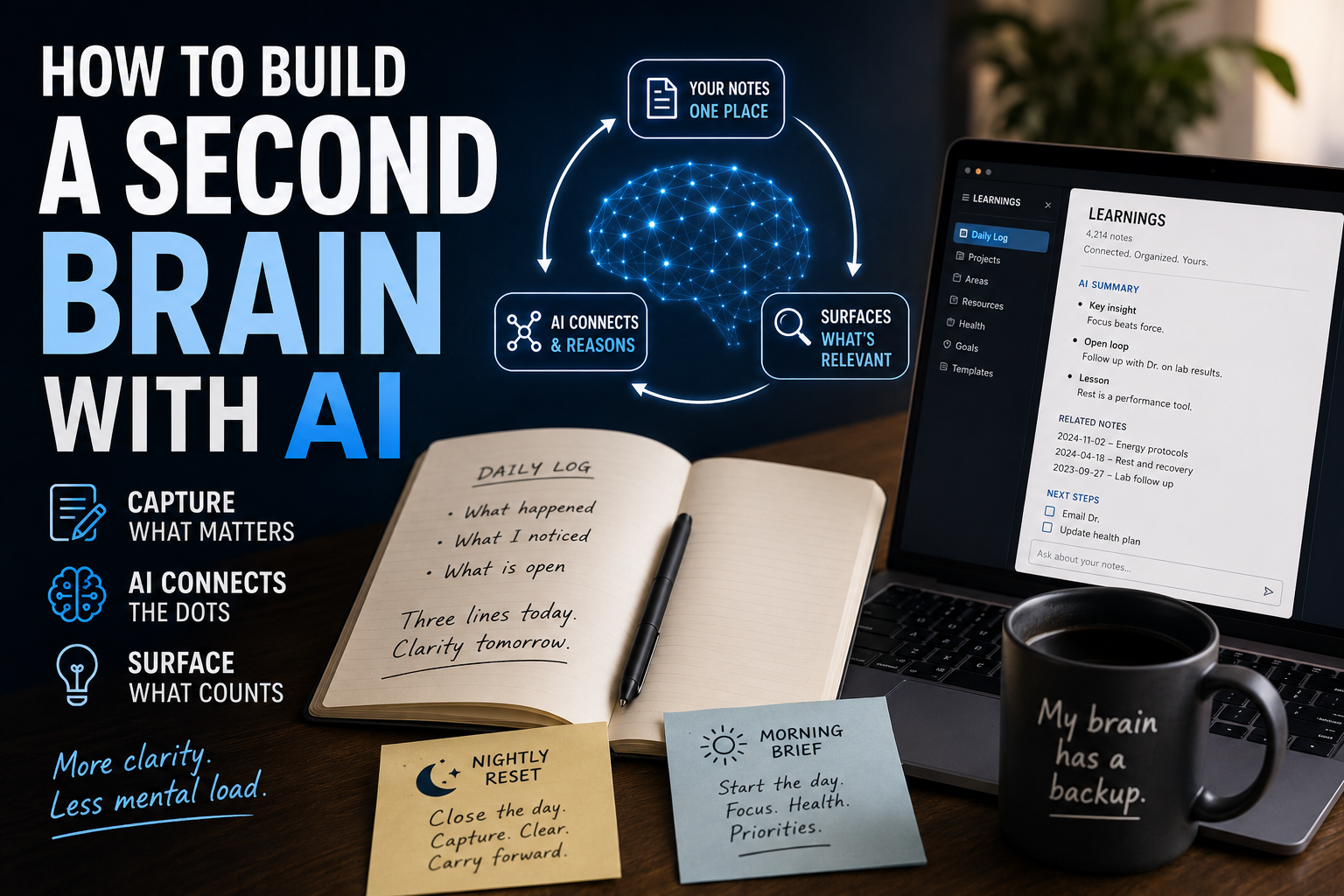
A second brain with AI adds one capability the older versions never had: the system can tend itself. AI can read what you wrote today, link it to something you wrote six months ago, summarize it, and bring it back when it becomes relevant, without you doing the filing.
Older tools stored. AI retrieves, connects, and explains. That is the difference, and it is the reason this is worth building now.
You already have early versions of this. A calendar. A notes app. A to-do list. Those are all external memory. What changes is that AI moves the system from a drawer you have to dig through into something closer to an assistant that hands you the right note at the right time.
Why I Built One
I am not writing this as a productivity hobbyist. I had a stroke, and it changed how my memory works.
The visible deficits get the attention. The quiet one is retrieval. You know you know a word, a plan, a decision, and it will not surface. For a while I tried to fix that with willpower and longer checklists. It did not work, because the problem was never effort. The problem was infrastructure.
So I stopped asking my brain to hold everything and built a system to hold it instead. If your memory is healthy, a second brain is convenient. If your retrieval is taxed by stroke, ADHD, burnout, long COVID, or chronic illness, it is closer to necessary. The build is the same either way.
How to Build a Second Brain With AI, Step by Step
You do not need 4,000 notes to get value. You need one file and a habit. Here is the order that works.
Pick one home for everything. Choose a single place you will actually return to. I use Obsidian, a free app that stores notes as plain text files you control. Notion, Apple Notes, or a single Google Doc also work. The tool matters less than picking one and staying there.
Start with one daily file. Call it Daily Log, or LEARNINGS, or whatever you will reopen. At the end of each day, write three things: what happened, what you noticed, what is still open. That is the whole habit on day one.
Add the AI review step. Paste the day’s entry into an AI tool and use a prompt like this:
“Here is today’s log. Tell me the most important thing to carry into tomorrow, the one open loop I need to close, and one thing I learned today even if I did not call it a lesson.”
Give the AI context so it can connect, not just answer. Tell it who you are, what you are working on, and what matters this season. The more it knows your situation, the more it surfaces the right thread instead of a generic one. Persistent context is what turns a chatbot into a second brain.
Build the two anchors: a nightly reset and a morning brief. My system runs an end-of-day reset that pulls from my calendar, email, and notes, writes a summary, flags open loops, and appends to a running LEARNINGS log. Every morning a brief is ready before I wake, holding my priorities, my health protocols, and what I said I wanted to focus on this year. These two routines are the backbone. Everything else is optional.
Review weekly and let it compound. Once a week, read back through your entries. The value is not any single note. It is the pattern you can finally see because the system held it for you.
The Tools I Actually Use
I keep this honest because the audience can smell an ad. My stack is two pieces:
Obsidian holds the vault. Local, plain text, free, mine.
Claude is the AI layer that reads, connects, and surfaces.
You can swap either one. ChatGPT or Gemini work as the AI layer. Notion or Apple Notes work as the store. The architecture is what matters, not the brand. One place to write, one intelligence to tend it.
Mistakes to Avoid
Building the system before you have the habit. A perfect vault with no daily entries is a folder, not a second brain. Start ugly.
Treating it like storage. If you only file things and never ask AI to surface them, you have rebuilt a filing cabinet. The retrieval step is the point.
Starting from scratch every session. Give the AI your context once and reuse it. Reconstruction is the expensive part, and it is the part this is meant to remove.
Quick Summary
A second brain with AI is one external place to store notes plus an AI layer that connects and surfaces them for you.
Start with one daily file and one review prompt. Do not build the whole system first.
Add two anchors: a nightly reset and a morning brief.
Give the AI persistent context so it retrieves the right thread, not a generic one.
The tool is interchangeable. The architecture, one store plus one intelligence, is what works.
If you want that “one store” already wired for recovery, the Brain Recovery Dashboard for Notion is the version I built — with an AI prompt vault baked in so you reuse the prompts from the AI Cognitive-Prosthetic Prompt Pack instead of rewriting them.
FAQ
What is a second brain with AI?
It is an external note system paired with an AI tool that reads, links, summarizes, and surfaces your notes, so your memory does not have to hold everything. The store keeps the information; the AI does the connecting and retrieving.
What is the best AI for a second brain?
The best one is the one you will use consistently. I use Claude because it handles long context well, but ChatGPT and Gemini also work. What raises quality most is not the model, it is giving the AI persistent context about your life and goals.
How do I start a second brain for free?
Open a free tool like Obsidian or Apple Notes, create one daily file, and write three lines at the end of each day: what happened, what you noticed, what is open. Add a free AI tool to review that entry. That is a working second brain at zero cost.
Do I need Obsidian specifically?
No. Any system you will actually return to works. Obsidian is local, free, and plain text, which I value, but Notion, Apple Notes, or a single document are all fine starting points.
Can AI organize my notes automatically?
AI can summarize, tag, link related notes, and surface what is relevant, which feels like organization. It works best when the AI has standing context about your situation rather than seeing each note cold.
How is this different from just using ChatGPT?
A raw chat forgets you between sessions. A second brain gives the AI a durable store to read from and write to, so context accumulates instead of resetting. The store is the memory. The chat is just the conversation.
Written by Blake Murphy, a stroke survivor documenting how AI rebuilds a changed brain in real time. If this was useful, the companion piece is “My Brain Has a Backup,” which tells the story behind the system.

Leave a Reply